Pagination
Table of contents
- Overview
- Basic Pagination
- Search, Filtering, and Sorting
- Rendering and Layouts
- React Support
- Supporting PHP and React Views Together
- Testing
- API Reference
- A. Pagination
- B. SearchFilter
- C. JSON Shapes
- Upgrading From Earlier Versions
1. Overview Table of Contents
Pagination splits long lists of records into pages and renders the links used to move between them. Support is built from three parts that can be used together or on their own:
Pagination- Tracks the current page, page size, and total number of records. It calculates the limit and offset for your query, builds page links, and renders the controls.SearchFilter- Turns search terms, filters, and sort options from the request into query parameters. Columns must be whitelisted by the developer, and every value goes through bound parameters.- Renderers - Control what the page links look like. Bootstrap 5 is the default. Tailwind, a custom view partial, or your own renderer class can be used instead.
Both PHP views and React views are supported. React pages use the Pagination, PaginationSummary, and SortableTh components along with the usePaginatedQuery hook.
An example is shown below in Figure 1.
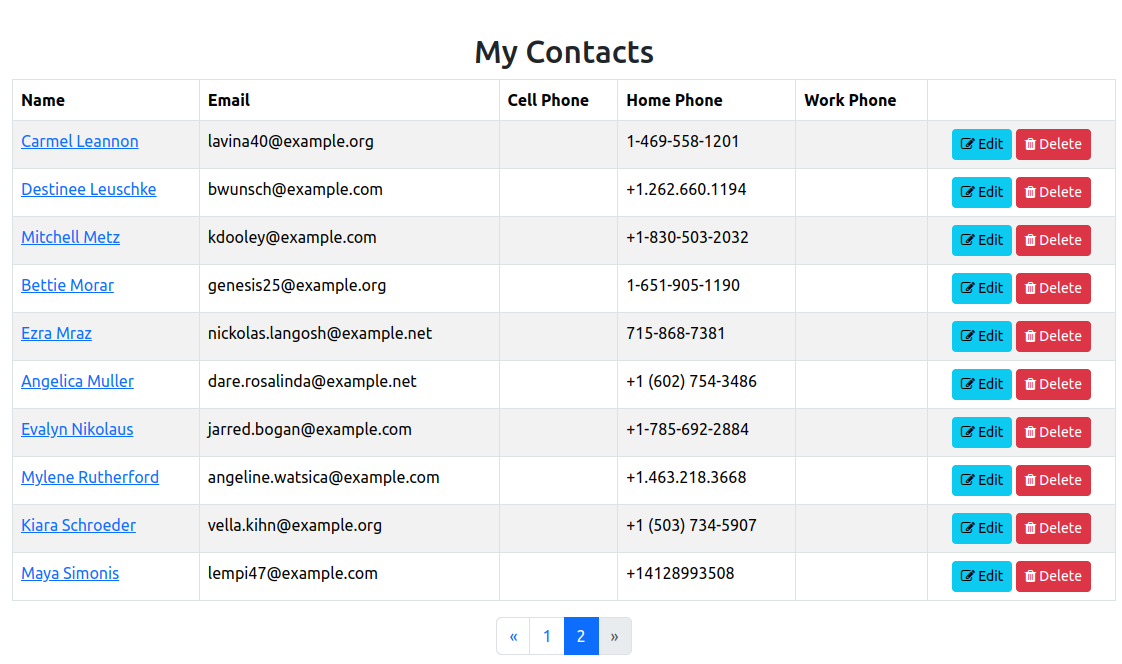
Figure 1 - Pagination example
2. Basic Pagination Table of Contents
The following are instructions for setting up pagination within your controller. We will use the indexAction of the ContactsController.
A. Import Pagination Class
use Core\Lib\Pagination\Pagination;
B. Create The Pagination Object
Pagination::fromRequest() reads the page value from the request and creates the object in one step. It accepts three parameters:
$request- The request object.$limit- The maximum number of records per page.$totalItems- The total number of records in the list.
We use findTotal to count the contacts that belong to the current user.
$pagination = Pagination::fromRequest($this->request, 10, Contacts::findTotal([
    'conditions' => 'user_id = ?',
    'bind'       => [$this->currentUser->id]
]));
The page number is validated before it is used. A missing or invalid value such as ?page=abc or ?page=-2 becomes page 1, and a page past the end such as ?page=999 becomes the last page.
C. Retrieve Paginated Records
Use the paginationParams function to build the query for the model’s find function. It adds the limit and offset for the current page.
$contacts = Contacts::find($pagination->paginationParams(
    'user_id = ?',                  // Conditions
    [$this->currentUser->id],       // Bind
    'lname, fname'                  // Order
));
D. Adding Pagination To The View
Pass the Pagination object to the view:
$this->view->pagination = $pagination;
Within your view, add the following line where the page links should appear. In this case, it goes right after the closing tag for the table element:
<?= $this->pagination->render() ?>
Nothing is rendered when all records fit on one page.
E. Complete Example
Putting everything together, here is the complete indexAction function:
public function indexAction(): void {
    $pagination = Pagination::fromRequest($this->request, 10, Contacts::findTotal([
        'conditions' => 'user_id = ?',
        'bind'       => [$this->currentUser->id]
    ]));

    $contacts = Contacts::find($pagination->paginationParams(
        'user_id = ?',
        [$this->currentUser->id],
        'lname, fname'
    ));

    $this->view->contacts = $contacts;
    $this->view->pagination = $pagination;
    $this->view->render('contacts.index');
}
And the view:
<?php $this->setSiteTitle("My Contacts"); ?>

<?php $this->start('body'); ?>
<h2 class="text-center">My Contacts</h2>
<table class="table table-striped table-bordered table-hover">
    <thead>
        <th>Name</th>
        <th>Email</th>
        <th>Cell Phone</th>
        <th></th>
    </thead>
    <tbody>
        <?php foreach($this->contacts as $contact): ?>
            <tr>
                <td>
                    <a href="<?=route('contacts.details', [$contact->id])?>">
                        <?= $contact->displayName(); ?>
                    </a>
                </td>
                <td><?= $contact->email ?></td>
                <td><?= $contact->cell_phone ?></td>
                <td class="text-center">
                    <a href="<?=route('contacts.edit', [$contact->id])?>" class="btn btn-info btn-sm">
                        <i class="fa fa-edit"></i> Edit
                    </a>
                </td>
            </tr>
        <?php endforeach; ?>
    </tbody>
</table>

<?= $this->pagination->render() ?>
<?php $this->end(); ?>
3. Search, Filtering, and Sorting Table of Contents
The SearchFilter class reads the search term, filters, and sort order from the request and turns them into the conditions, bind, and order parameters used by find and findTotal. The same filter is used for both the count and the page query, so the total always matches the results.
The examples in this section come from the admin dashboard’s user list.
A. Building a SearchFilter
Following the service layer pattern, build the filter in a service so the controller stays thin:
use Core\Lib\Pagination\SearchFilter;
use Core\Models\ACL;

public static function userFilter(object $request): SearchFilter {
    return SearchFilter::fromRequest($request)
        ->where('id != ?', [AuthService::currentUser()->id])
        ->searchable(['username', 'email', 'fname', 'lname'])
        ->filterable(['inactive' => array_keys(self::STATUS_OPTIONS)])
        ->filterJsonContains('acl', array_keys(ACL::getOptionsForForm()))
        ->sortable(['username', 'acl', 'inactive', 'created_at', 'updated_at'], 'created_at', 'desc');
}
where() adds a condition that always applies. In this case it excludes the current user. It can be called more than once.
B. Searchable Columns
searchable() lists the columns matched against the search term. The term is read from the q query parameter and matched with LIKE against each column. A record matches when any column contains the term.
?q=ann
Produces:
(username LIKE ? ESCAPE '!' OR email LIKE ? ESCAPE '!' OR ...)
Wildcard characters typed by the user are escaped, so a search for 50% matches the literal text 50%. This works the same on MySQL and SQLite.
C. Filterable Columns
filterable() lists columns that can be filtered with an exact match. The query parameter has the same name as the column. Values can be limited to a list:
->filterable(['inactive' => ['0', '1']])   // only 0 or 1 allowed
->filterable(['status'])                     // any value allowed
A value that is not in the list, or is empty, is ignored. The list is shown in full instead of returning an error.
D. JSON Array Columns
Some columns store a JSON array. For example, users.acl holds values like ["Admin","test"]. Use filterJsonContains() to match records whose array contains the selected value:
->filterJsonContains('acl', array_keys(ACL::getOptionsForForm()))
With ?acl=Admin, a user whose acl is ["Admin","test"] matches. A user with ["SuperAdmin"] does not, because the match includes the JSON quotes around the value.
E. Custom Filters
For anything other than an exact match, use filterUsing(). It accepts the query parameter name, a list of allowed values (or null for any value), and a function that returns the SQL and its bind values:
->filterUsing('joined', ['recent', 'older'], fn(string $value) => $value === 'recent'
    ? ['created_at >= ?', [date('Y-m-d', strtotime('-30 days'))]]
    : ['created_at < ?',  [date('Y-m-d', strtotime('-30 days'))]])
The function only runs when the value is allowed.
F. Sortable Columns
sortable() lists the columns users may sort by, along with the default sort column and direction. The sort column is read from the sort parameter and the direction from dir:
?sort=username&dir=asc
Columns not in the list are ignored and the default is used instead.
The parameter names can be changed with params(). This is useful when a page has two filtered lists:
->params('user_q', 'user_sort', 'user_dir')
G. Using The Filter In A Controller
Use the filter’s findParams() for the count and the Pagination object’s queryParams() for the page query. withFilter() keeps the search, filters, and sort in every page link.
public function indexAction(): void {
    $filter = DashboardService::userFilter($this->request);
    $pagination = Pagination::fromRequest($this->request, 10, Users::findTotal($filter->findParams()))
        ->withFilter($filter);

    $this->view->users = Users::find($pagination->queryParams($filter));
    $this->view->filter = $filter;
    $this->view->pagination = $pagination;
    $this->view->aclOptions = ACL::getOptionsForForm();
    $this->view->statusOptions = DashboardService::STATUS_OPTIONS;
    $this->view->render('admindashboard.index');
}
H. Search Form And Sortable Headers
The filter provides what the view needs to show the current state:
term()- The current search term.activeFilters()- The filters that were applied, after validation.isActive()- True when a search or filter is applied. Use it to show a “Clear” link.sortUrl($column)- The link for a sortable column header. It switches direction when the column is already sorted.sortColumn()andsortDirection()- The current sort.
The search form submits with GET:
<?php
$e = fn($value): string => htmlspecialchars((string)$value, ENT_QUOTES, 'UTF-8');
$filters = $this->filter->activeFilters();
?>
<form method="get" class="row g-2 mb-3 align-items-end">
    <div class="col-md-5">
        <label for="q" class="form-label">Search</label>
        <input type="search" id="q" name="q" class="form-control" value="<?= $e($this->filter->term()) ?>">
    </div>
    <div class="col-md-2">
        <label for="acl" class="form-label">Access Level</label>
        <select id="acl" name="acl" class="form-select">
            <option value="">All</option>
            <?php foreach ($this->aclOptions as $value => $label): ?>
                <option value="<?= $e($value) ?>" <?= ($filters['acl'] ?? null) === (string)$value ? 'selected' : '' ?>>
                    <?= $e($label) ?>
                </option>
            <?php endforeach; ?>
        </select>
    </div>
    <div class="col-md-3 d-flex gap-2">
        <button type="submit" class="btn btn-primary flex-fill">Search</button>
        <?php if ($this->filter->isActive()): ?>
            <a href="?" class="btn btn-outline-secondary flex-fill">Clear</a>
        <?php endif; ?>
    </div>
</form>
Sortable column headers:
<th>
<a href="<?= $e($this->filter->sortUrl('username')) ?>">
Username
<?php if ($this->filter->sortColumn() === 'username'): ?>
<?= $this->filter->sortDirection() === 'asc' ? '▲' : '▼' ?>
<?php endif; ?>
</a>
</th>
Changing the search, a filter, or the sort always returns to page 1.
I. Security
- Column names are only taken from the lists you configure, never from the request. Configured names must be plain identifiers such as
emailorusers.email. Anything else is dropped. - All values go through bound parameters.
- The request object HTML-encodes input values.
SearchFilter::fromRequest()decodes them before matching and searching, so values such asO'Brien & Cowork correctly. Always escape output in your views as shown above.
4. Rendering and Layouts Table of Contents
render() uses a renderer to produce the page links. Long lists show a window of pages around the current one, with the first and last pages always shown:
« 1 … 8 9 [10] 11 12 … 20 »
A. Bootstrap
Bootstrap 5 is used by default. The alignment class can be changed:
use Core\Lib\Pagination\Renderers\BootstrapRenderer;

<?= $this->pagination->render(new BootstrapRenderer('justify-content-end')) ?>
B. Tailwind
use Core\Lib\Pagination\Renderers\TailwindRenderer;

<?= $this->pagination->render(new TailwindRenderer()) ?>
To change the colors, extend TailwindRenderer and override the $linkClass, $activeClass, or $disabledClass properties.
C. Custom View Partial
ViewRenderer renders a PHP partial, so you control all of the markup. The partial receives the $pagination variable.
use Core\Lib\Pagination\Renderers\ViewRenderer;

<?= $this->pagination->render(new ViewRenderer(ROOT . '/resources/views/components/pagination.php')) ?>
Example partial with a summary and Previous/Next buttons:
<?php $e = fn($v) => htmlspecialchars((string)$v, ENT_QUOTES, 'UTF-8'); ?>
<?php if ($pagination->hasPages()): ?>
<div class="d-flex justify-content-between align-items-center">
    <small class="text-muted">
        Showing <?= $pagination->firstItem() ?>–<?= $pagination->lastItem() ?> of <?= $pagination->totalItems() ?>
    </small>
    <div class="btn-group">
        <?php if ($url = $pagination->previousPageUrl()): ?>
            <a class="btn btn-outline-secondary btn-sm" href="<?= $e($url) ?>">Previous</a>
        <?php endif; ?>
        <?php if ($url = $pagination->nextPageUrl()): ?>
            <a class="btn btn-outline-secondary btn-sm" href="<?= $e($url) ?>">Next</a>
        <?php endif; ?>
    </div>
</div>
<?php endif; ?>
D. Custom Renderer Class
For another CSS framework, extend AbstractHtmlRenderer and supply the markup for each part. The base class handles the page window, the Previous and Next links, and skipping single pages.
use Core\Lib\Pagination\Renderers\AbstractHtmlRenderer;
class BulmaRenderer extends AbstractHtmlRenderer {
protected function link(string $url, string $label, ?string $ariaLabel = null): string {
$aria = $ariaLabel ? ' aria-label="' . $this->e($ariaLabel) . '"' : '';
return '<li><a class="pagination-link" href="' . $this->e($url) . '"' . $aria . '>' . $label . '</a></li>';
}
protected function active(string $label): string {
return '<li><a class="pagination-link is-current" aria-current="page">' . $label . '</a></li>';
}
protected function disabled(string $label, string $ariaLabel): string {
return '<li><span class="pagination-link" disabled>' . $label . '</span></li>';
}
protected function gap(): string {
return '<li><span class="pagination-ellipsis">…</span></li>';
}
protected function wrap(string $items): string {
return '<nav class="pagination" aria-label="Page navigation"><ul class="pagination-list">' . $items . '</ul></nav>';
}
}
Use $this->e() to escape URLs. For complete control, implement the PaginationRenderer interface, which has a single render(Pagination $pagination): string function.
E. Changing The Default Renderer
To use a different renderer everywhere, set it once during startup:
Pagination::setDefaultRenderer(new TailwindRenderer());
After this, render() without arguments uses Tailwind.
F. Link Options
These functions can be chained when creating the Pagination object:
withWindow(int $window)- The number of page links shown on each side of the current page. The default is 2.withPath(string $path)- Base path for links, such as/contacts. By default, links are relative to the current URL.withPageName(string $name)- Changes thepagequery parameter. Use this for two lists on one page, and pass the same name toPagination::currentPage($request, $name).withQuery(array $query)- Query parameters to keep in every link.withFilter()sets this for you.
$pagination = Pagination::fromRequest($this->request, 10, $total)
    ->withWindow(3)
    ->withPath('/contacts');
5. React Support Table of Contents
React pages use the same Pagination and SearchFilter classes. Read the React page first for details about renderJsx and page components.
A. How It Works
- The first visit renders the page with the first page of records passed in as props, so the list appears without waiting on a request.
- Changing the page, sort, or a filter fetches JSON from the same URL. The api helpers send an
X-Requested-Withheader, and the controller uses$this->request->isAjax()to return JSON instead of HTML. - The URL in the address bar is updated on every change. Refreshing, sharing a link, and the browser’s Back and Forward buttons all work.
- Page links are real links, so opening a page in a new tab works as expected.
B. Controller
public function indexAction(): void {
    $list = DashboardService::userList($this->request);

    if ($this->request->isAjax()) {
        $this->jsonResponse(['success' => true] + $list, 200, ['Vary' => 'X-Requested-With']);
        return;
    }

    $this->view->setSiteTitle('Administration');
    $this->view->renderJsx('admindashboard.Index', $list + [
        'aclOptions'    => DashboardService::optionList(ACL::getOptionsForForm()),
        'statusOptions' => DashboardService::optionList(DashboardService::STATUS_OPTIONS),
    ]);
}
The Vary header is required because one URL returns both HTML and JSON. Without it, the browser may show the raw JSON when the user leaves the page and presses Back.
C. Building Props
Props must be plain arrays. Both Pagination and SearchFilter have a toArray() function for this. Convert models to arrays that contain only the fields the page needs. Never pass whole models, which can contain password hashes and tokens.
public static function userList(object $request, int $perPage = 10): array {
    $filter = self::userFilter($request);
    $pagination = Pagination::fromRequest($request, $perPage, self::totalUsers($filter))
        ->withFilter($filter);

    return [
        'users'      => array_map([self::class, 'userToArray'], self::paginateUsers($pagination, $filter)),
        'pagination' => $pagination->toArray(),
        'filter'     => $filter->toArray(),
    ];
}

public static function userToArray(Users $user): array {
    $acl = json_decode((string)$user->acl, true);
    return [
        'id'          => (int)$user->id,
        'username'    => $user->username,
        'acl'         => is_array($acl) ? array_values(array_filter($acl)) : [],
        'inactive'    => (int)$user->inactive === 1,
        'created_ago' => DateTime::timeAgo($user->created_at),
    ];
}
Pass dropdown options as a list of value and label pairs with optionList(). PHP turns an array with the keys '0' and '1' into a JSON list, which loses the values.
public static function optionList(array $options): array {
    $list = [];
    foreach ($options as $value => $label) {
        $list[] = ['value' => (string)$value, 'label' => (string)$label];
    }
    return $list;
}
D. Page Component
The page component at resources/js/pages/admindashboard/Index.jsx passes its props to usePaginatedQuery and renders from the data it returns:
import React, { useEffect, useState } from 'react';
import { documentTitle, route } from '@chappy/utils';
import usePaginatedQuery from '@chappy/utils/usePaginatedQuery';
import Pagination, { PaginationSummary, SortableTh } from '@chappy/components/Pagination';

export default function Index({ users, pagination, filter, aclOptions = [] }) {
    documentTitle('Administration');

    const { data, params, loading, error, update, goToPage, reset } =
        usePaginatedQuery({ users, pagination, filter });

    // The search box is local until submitted.
    const [term, setTerm] = useState(params.q ?? '');
    useEffect(() => setTerm(params.q ?? ''), [params.q]);

    const onSort = (column, dir) => update({ sort: column, dir });

    return (
        <>
            <form onSubmit={(e) => { e.preventDefault(); update({ q: term.trim() }); }} role="search">
                <input type="search" value={term} onChange={(e) => setTerm(e.target.value)} />
                <select value={data.filter.filters.acl ?? ''} onChange={(e) => update({ acl: e.target.value })}>
                    <option value="">All</option>
                    {aclOptions.map((o) => <option key={o.value} value={o.value}>{o.label}</option>)}
                </select>
                <button type="submit">Search</button>
                {data.filter.active && <button type="button" onClick={reset}>Clear</button>}
            </form>

            {error && <div className="alert alert-danger" role="alert">{error}</div>}

            <PaginationSummary pagination={data.pagination} noun="users" />

            <table className="table" aria-busy={loading}>
                <thead>
                    <tr>
                        <SortableTh column="username" filter={data.filter} onSort={onSort}>Username</SortableTh>
                        <SortableTh column="created_at" filter={data.filter} onSort={onSort}>Created</SortableTh>
                        <th></th>
                    </tr>
                </thead>
                <tbody>
                    {data.users.map((user) => (
                        <tr key={user.id}>
                            <td>{user.username}</td>
                            <td>{user.created_ago}</td>
                            <td><a href={route('admindashboard.details', [user.id])}>Details</a></td>
                        </tr>
                    ))}
                </tbody>
            </table>

            <Pagination pagination={data.pagination} onPageChange={goToPage} />
        </>
    );
}
Read the current filter and sort from data.filter, not from params. data.filter contains the values the server accepted after validation. The full version of this page with Bootstrap layout, status filter, empty state, and widgets ships with the admin dashboard.
E. Pagination Component
Renders Bootstrap 5 page links from Pagination::toArray(). Nothing is rendered when there is only one page.
Props:
pagination- Output ofPagination::toArray().onPageChange- Optional. Called with the page number. When set, clicks are handled without reloading the page. Ctrl and Cmd clicks still open a new tab.className- Classes for the list. Default isjustify-content-center.label- Thearia-labelfor the navigation element.
<Pagination pagination={data.pagination} onPageChange={goToPage} />
Without onPageChange, the links work as normal links that load the next page from the server.
F. PaginationSummary Component
Shows a line such as “Showing 11–20 of 45 users”. Nothing is rendered when there are no results.
Props:
pagination- Output ofPagination::toArray().noun- Name of the items. Default isresults.className- Default istext-muted small mb-2.
<PaginationSummary pagination={data.pagination} noun="users" />
G. SortableTh Component
A table header cell that sorts by its column when clicked. It shows ▲ or ▼ on the sorted column and sets aria-sort for screen readers. Clicking the sorted column switches direction, and a new column starts ascending.
Props:
column- The column name. It must be listed insortable()on the server.filter- Output ofSearchFilter::toArray().onSort- Called with the column and the new direction.children- The header label.
<SortableTh column="username" filter={data.filter} onSort={(column, dir) => update({ sort: column, dir })}>
    Username
</SortableTh>
H. usePaginatedQuery Hook
Manages fetching and URL state for a paginated list.
const { data, params, loading, error, update, goToPage, reset } = usePaginatedQuery(initialData, options);
Parameters:
initialData- The props rendered by the server, such as{ users, pagination, filter }.options.path- The URL to fetch. Default is the current path.options.pageParam- The page query parameter. Default ispage.
Returns:
data- The current results. Starts asinitialDataand is replaced by each JSON response.params- The current query parameters from the URL.loading- True while a request is running.error- An error message, ornull.update(changes, options)- Merges changes into the query parameters and fetches. Empty values remove a parameter. Returns to page 1 unless{ resetPage: false }is passed. Pass{ replace: true }to replace the browser history entry instead of adding one.goToPage(page)- Moves to a page.reset()- Removes all parameters, including search, filters, and sort.
When the user changes the list quickly, older requests are cancelled so results always match the latest change.
6. Supporting PHP and React Views Together Table of Contents
One controller action can serve a PHP view, a React view, and the JSON for the React view. The service builds the filter and the query for all three.
public function indexAction(): void {
    $filter = DashboardService::userFilter($this->request);
    $pagination = Pagination::fromRequest($this->request, 10, DashboardService::totalUsers($filter))
        ->withFilter($filter);
    $users = DashboardService::paginateUsers($pagination, $filter);

    // React page asking for a new page, sort, or filter
    if ($this->request->isAjax()) {
        $this->jsonResponse([
            'success'    => true,
            'users'      => array_map([DashboardService::class, 'userToArray'], $users),
            'pagination' => $pagination->toArray(),
            'filter'     => $filter->toArray(),
        ], 200, ['Vary' => 'X-Requested-With']);
        return;
    }

    $this->view->setSiteTitle('Administration');

    // Replace with your own setting for choosing PHP or React views.
    $useReact = env('USE_REACT_VIEWS', false);

    if ($useReact) {
        $this->view->renderJsx('admindashboard.Index', [
            'users'         => array_map([DashboardService::class, 'userToArray'], $users),
            'pagination'    => $pagination->toArray(),
            'filter'        => $filter->toArray(),
            'aclOptions'    => DashboardService::optionList(ACL::getOptionsForForm()),
            'statusOptions' => DashboardService::optionList(DashboardService::STATUS_OPTIONS),
        ]);
        return;
    }

    // PHP view
    $this->view->users         = $users;
    $this->view->filter        = $filter;
    $this->view->pagination    = $pagination;
    $this->view->aclOptions    = ACL::getOptionsForForm();
    $this->view->statusOptions = DashboardService::STATUS_OPTIONS;
    $this->view->render('admindashboard.index');
}
The two view types receive different data:
| PHP view | React view | |
|---|---|---|
| Records | Model objects | Arrays from a toArray function |
| Pagination | Pagination object, call render() |
Pagination::toArray() |
| Filter | SearchFilter object, call sortUrl() and others |
SearchFilter::toArray() |
| Dropdown options | value => label array |
List from optionList() |
7. Testing Table of Contents
The following examples show how to test paginated lists in your own application.
Testing a SearchFilter With PHPUnit
A SearchFilter can be created directly from an array, so the filter your service builds can be tested without a request or a database. Check that allowed values are applied and that anything else is ignored:
<?php
namespace Tests\Unit;

use Core\Lib\Pagination\Pagination;
use Core\Lib\Pagination\SearchFilter;
use PHPUnit\Framework\TestCase;

class ContactFilterTest extends TestCase {
    private function filter(array $input): SearchFilter {
        return (new SearchFilter($input))
            ->where('user_id = ?', [1])
            ->searchable(['fname', 'lname', 'email'])
            ->sortable(['lname', 'created_at'], 'lname');
    }

    public function test_search_matches_name_and_email(): void {
        $params = $this->filter(['q' => 'ann'])->findParams();

        $this->assertStringContainsString('fname LIKE ?', $params['conditions']);
        $this->assertSame([1, '%ann%', '%ann%', '%ann%'], $params['bind']);
    }

    public function test_unknown_sort_column_uses_default(): void {
        $params = $this->filter(['sort' => 'password'])->findParams();
        $this->assertSame('lname ASC', $params['order']);
    }

    public function test_page_links_keep_the_search(): void {
        $filter = $this->filter(['q' => 'ann']);
        $pagination = (new Pagination(1, 10, 30))->withFilter($filter);

        $this->assertSame('?q=ann&page=2', $pagination->url(2));
    }
}
Run it with the console’s test command. More information can be found on the PHPUnit page.
Testing a React Page With Vitest
Pages that import from @chappy/utils load TinyMCE, which calls window.matchMedia when it loads. jsdom does not provide this function. If your setup.js in the project root does not already define it, add the following:
if (!window.matchMedia) {
  window.matchMedia = (query) => ({
    matches: false,
    media: query,
    onchange: null,
    addListener() {},
    removeListener() {},
    addEventListener() {},
    removeEventListener() {},
    dispatchEvent() { return false; },
  });
}
To test paging without a server, replace fetch with a function that returns JSON in the same shape as your controller’s response. The example below renders the page with its first page of results, clicks page 2, and checks the new results, the URL, and the header that tells the controller to return JSON:
import React from 'react';
import { render, screen, fireEvent } from '@testing-library/react';
import { describe, it, expect, vi, beforeEach, afterEach } from 'vitest';
import Index from '@/pages/contacts/Index';

const pagination = (current) => ({
    current_page: current, per_page: 10, total: 15, total_pages: 2,
    from: (current - 1) * 10 + 1, to: Math.min(current * 10, 15),
    prev_url: current > 1 ? `?page=${current - 1}` : null,
    next_url: current < 2 ? `?page=${current + 1}` : null,
    links: [1, 2].map((p) => ({ page: p, url: `?page=${p}`, active: p === current })),
});

const filter = {
    term: '', filters: {}, sort: 'lname', dir: 'asc', active: false, query: {},
    params: { search: 'q', sort: 'sort', dir: 'dir' },
};

beforeEach(() => window.history.replaceState(null, '', '/contacts'));
afterEach(() => vi.unstubAllGlobals());

describe('Contacts index', () => {
    it('loads the next page without reloading', async () => {
        const fetchMock = vi.fn(async () => new Response(
            JSON.stringify({ success: true, contacts: [{ id: 11, name: 'Zoe' }], pagination: pagination(2), filter }),
            { status: 200, headers: { 'Content-Type': 'application/json' } }
        ));
        vi.stubGlobal('fetch', fetchMock);

        render(<Index contacts={[{ id: 1, name: 'Ann' }]} pagination={pagination(1)} filter={filter} />);
        fireEvent.click(screen.getByRole('link', { name: '2' }));

        expect(await screen.findByText('Zoe')).toBeInTheDocument();
        expect(window.location.search).toBe('?page=2');
        expect(fetchMock.mock.calls[0][1].headers['X-Requested-With']).toBe('XMLHttpRequest');
    });
});
More information can be found on the Vitest page.
8. API Reference Table of Contents
A. Pagination
Namespace: Core\Lib\Pagination\Pagination
| Function | Description |
|---|---|
__construct(int $currentPage = 1, int $limit = 10, int $totalItems = 0) |
Creates the object. The page is kept within range. |
static fromRequest(object $request, int $limit, int $totalItems) |
Creates the object using the page number from the request. |
static currentPage(object $request, string $pageName = 'page') |
Returns the validated page number. Invalid values return 1. |
withFilter(SearchFilter $filter) |
Keeps the filter’s search, filters, and sort in page links. |
withQuery(array $query) |
Keeps the given query parameters in page links. |
withPath(string $path) |
Sets the base path for links. |
withPageName(string $pageName) |
Changes the page query parameter. |
withWindow(int $window) |
Sets how many page links appear on each side of the current page. |
static setDefaultRenderer(PaginationRenderer $renderer) |
Sets the renderer used by render(). |
currentPageNumber() |
The current page. |
limit() |
Records per page. |
totalItems() |
Total number of records. |
totalPages() |
Total number of pages. |
offset() |
The offset for the query. |
hasPages() |
True when there is more than one page. |
onFirstPage() / onLastPage() |
True on the first or last page. |
firstItem() / lastItem() |
The record numbers shown on this page, such as 11 and 20. |
url(int $page) |
The URL for a page. |
previousPageUrl() / nextPageUrl() |
The URL for the previous or next page, or null. |
pageRange() |
Page numbers to show. null marks a gap. |
queryParams(SearchFilter $filter) |
Query parameters from the filter plus limit and offset. |
paginationParams(mixed $conditions = '', array $bind = [], string $order = '') |
Query parameters with limit and offset. |
render(?PaginationRenderer $renderer = null) |
Renders the page links. |
toArray() |
State for React views and JSON. |
B. SearchFilter
Namespace: Core\Lib\Pagination\SearchFilter
| Function | Description |
|---|---|
__construct(array $input = []) |
Creates the filter from an array of input values. |
static fromRequest(object $request) |
Creates the filter from the request and decodes HTML-encoded values. |
where(string $condition, array $bind = []) |
Adds a condition that always applies. |
searchable(array $columns) |
Columns matched against the search term. |
filterable(array $filters) |
Columns that can be filtered with an exact match. |
filterJsonContains(string $column, ?array $allowed = null) |
Matches records whose JSON array column contains the value. |
filterUsing(string $param, ?array $allowed, Closure $build) |
Adds a filter with custom SQL. |
sortable(array $columns, string $default = '', string $defaultDir = 'asc') |
Columns that can be sorted and the default sort. |
params(string $search = 'q', string $sort = 'sort', string $dir = 'dir') |
Changes the query parameter names. |
term() |
The current search term. |
activeFilters() |
The filters that were applied. |
sortColumn() / sortDirection() |
The current sort. |
isActive() |
True when a search or filter is applied. |
findParams() |
Query parameters for find and findTotal, without limit and offset. |
query() |
The query parameters the user set, for links. |
sortUrl(string $column, string $path = '') |
The link for a sortable column header. |
toArray() |
State for React views and JSON. |
C. JSON Shapes
Pagination::toArray():
{
    "current_page": 2,
    "per_page": 10,
    "total": 25,
    "total_pages": 3,
    "from": 11,
    "to": 20,
    "prev_url": "?acl=Admin&page=1",
    "next_url": "?acl=Admin&page=3",
    "links": [
        { "page": 1, "url": "?acl=Admin&page=1", "active": false },
        { "page": 2, "url": "?acl=Admin&page=2", "active": true },
        { "page": 3, "url": "?acl=Admin&page=3", "active": false }
    ]
}
A gap in links has page and url set to null.
SearchFilter::toArray():
{
    "term": "",
    "filters": { "acl": "Admin" },
    "sort": "created_at",
    "dir": "desc",
    "active": true,
    "query": { "acl": "Admin" },
    "params": { "search": "q", "sort": "sort", "dir": "dir" }
}
9. Upgrading From Earlier Versions Table of Contents
Existing code continues to work. The following changes are recommended:
Pagination::pagination($page, $totalPages)is deprecated. Pass the Pagination object to the view and call$this->pagination->render()instead. The old function no longer uses a custom$base_url. UsewithPath()instead.Pagination::currentPage()now always returns an integer and returns 1 for invalid values.- The parameters of
paginationParams()are now optional, and empty values are left out of the result. DashboardService::paginateUsers()now requires aSearchFilter, andtotalUserCountExceptCurrent()is replaced bytotalUsers($filter). See the DashboardService page.
Before:
$page = Pagination::currentPage($this->request);
$pagination = new Pagination($page, 10, $total);
$this->view->pagination = Pagination::pagination($page, $pagination->totalPages());
<?= $this->pagination ?>
After:
$pagination = Pagination::fromRequest($this->request, 10, $total);
$this->view->pagination = $pagination;
<?= $this->pagination->render() ?>