Server Side Validation
Table of contents
1. Overview Table of Contents
Validators available in the HasValidators trait class can be used to validate forms. They are available through the Model class and there is no need to import.
2. Setup Table of Contents
Use the validator() method in your model and call it automatically when save() is invoked. Let’s use the addAction function from an example ContactsController class. As shown below on line 32, we have a displayErrors property for the View class. We generally set this value to a function call called getErrorMessages on the model. In this case, we are using the $contacts model because we want to add a new contact.
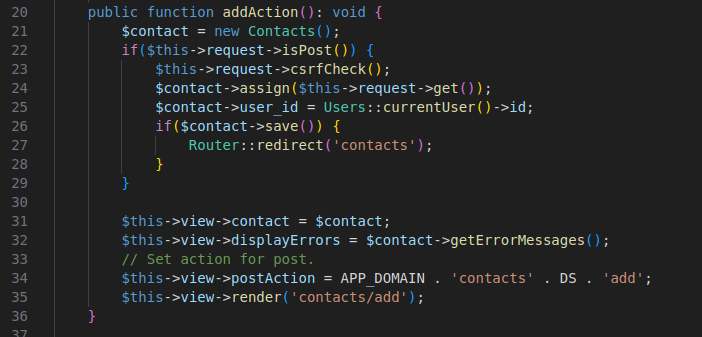
Figure 1 - Controller side setup
In the form you have two ways display errors:
- At the top of the form (general errors). You can also use the globally declared version called
errorBag. - Inline with input elements (specific field errors).
The form setup is shown below in figure 2.
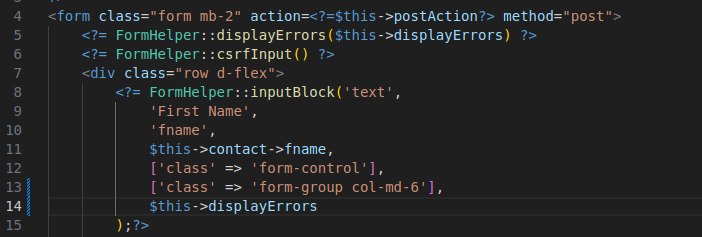
Figure 2 - Form setup
The result of submitting a form without entering required input is shown below. Note the box above all for elements. All action items will be listed here. Notice that since we added $this->displayErrors as an argument for the FormHelper::inputBlock for first name that the same message is below it as well along with styling around the input field.
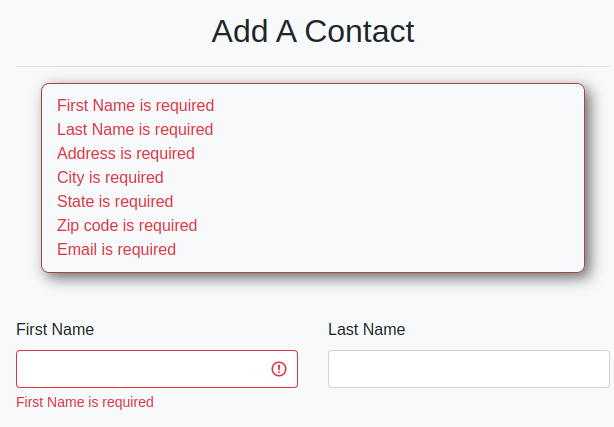
Figure 3 - Front end messages
3. Validation Rules Table of Contents
Validator Method
Each model defines its own validator() method:
public function validator(): void {
    // Enter your validation function calls here.
}
You can easily create a model with this function already created from the console by running the following command:
php console make:model ${Modelname}
Individual Validation Example
Here is an example from the Users model validator function for the fname field.
$this->runValidation($this->required()->fieldName('First Name')->max(150)->validate($this->fname));
As the parameter, chain your validators to $this and make sure the field to be validated is the argument for the final validate function call.
Short-form Example:
$this->runValidation('fname', ['required', 'max:150'], 'FirstName');
Similar to the short-form method of console validation, you provide the validators as an array. Using this method the runValidation() accepts the following parameters.
Parameters:
bool|object $param- The results of the validation operation or the name of the field to be tested.array $validators- An array of validators and any attributes that affect validation behavior.string $fieldName- The name of the field to be displayed in the error message.
4. Custom Validators Table of Contents
Custom validators can be implemented within your model classes. Use the following boiler plate to build your own validators.
public function myValidator(optionalParams): static {
    return $this->setValidator(function($response) use(optionalParams): void {
        if($response == null) return;

        // Validator implementation

        if(condition fails) {
            $this->addErrorMessage('My error message');
        }
    });
}
5. Why Front-End Validation Matters Table of Contents
While server-side validation is essential for application security and enforcing business rules, front-end validation enhances the user experience by providing instant feedback. Common examples include:
- Realtime password match checks
- Enforcing required fields before submission
- Format validation (e.g., email, phone numbers)
This framework includes JavaScript tools (see the JavaScript and Vite section) that support these features. For production-ready apps, always use both front-end and server-side validation together.
To include attributes for HTML5-based validation, use the $inputAttrs array in the form helper functions:
FormHelper::inputBlock('text', 'State', 'state', $this->contact->state, [
    'class' => 'form-control',
    'pattern' => '[A-Z]*',
    'placeholder' => 'ex: VA'
], ['class' => 'form-group col-md-3'], $this->displayErrors);
In this case:
patternenforces all-uppercase state abbreviationsplaceholdergives users an example
Another example for ZIP code:
FormHelper::inputBlock('text', 'Zip', 'zip', $this->contact->zip, [
    'class' => 'form-control',
    'pattern' => '[0-9]*',
    'placeholder' => 'ex: 90210'
], ['class' => 'form-group col-md-4'], $this->displayErrors);
JavaScript enhancements like password match validation can be injected into HTML automatically:
<script src="<?=Env::get('APP_DOMAIN', '/')?>resources/js/frontEndPasswordMatchValidate.js"></script>